The Single Point of Failure Hiding in Your Nextcloud Stack
Most Nextcloud admins eliminate single points of failure in compute, database, and networking. Storage is usually the one layer where the SPOF remains. This post identifies where it hides, reviews three configurations and their risks, and introduces a two-tier approach to protect your critical data.
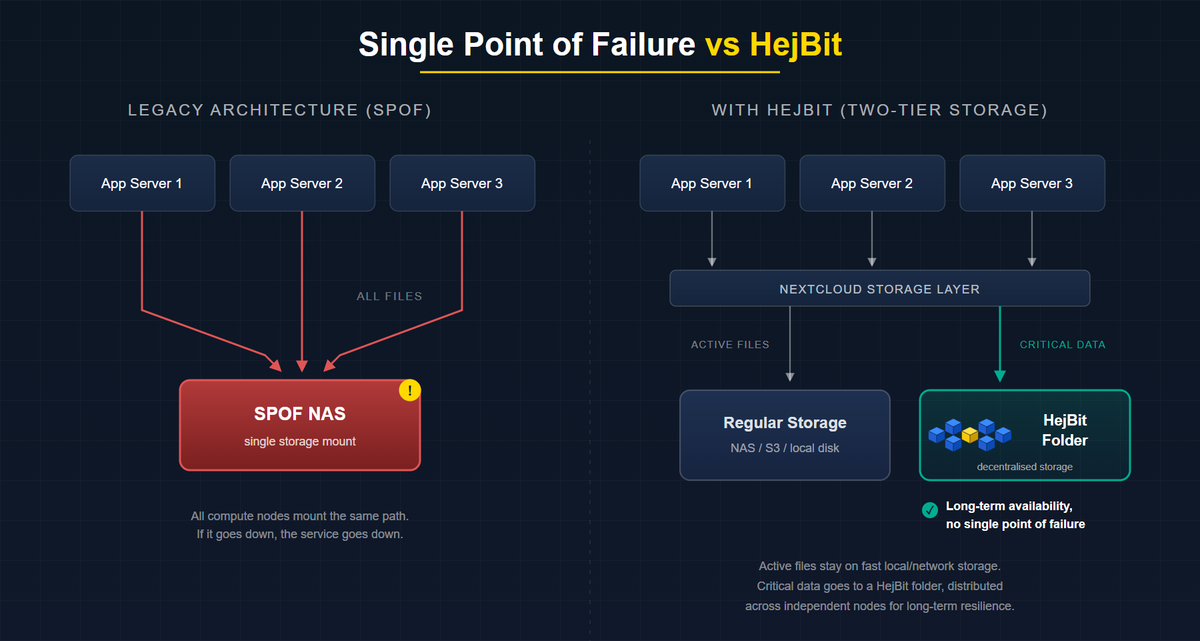
If you run Nextcloud in production, you have probably done the hard work to make it resilient. Multiple app servers. A load balancer in front. Redis for sessions. PostgreSQL with a follower. On paper, your deployment looks highly available (HA).
There is usually one layer where that work stops: storage. This post walks through where the single point of failure (SPOF) typically hides, why it survives even well-engineered environments, and the three conditions any storage backend needs to meet before you can honestly call it highly available.
The Incident That Doesn't Make the Post-Mortem
You have done the HA work. Multiple app servers. Nginx in front. Redis for session storage. PostgreSQL with a follower. The setup looks resilient.
And then your NAS goes down on a Friday evening.
It does not matter that three compute nodes are running. They are all mounting the same storage path. The service collapses in seconds, and by Saturday morning someone is on a call explaining to leadership why files are inaccessible and trying to remember when the last good backup was taken.
This is one of the most common Nextcloud failure modes, and it rarely lands in the post-mortem as a "storage architecture problem". It gets recorded as a hardware failure. The architectural gap underneath stays intact for the next incident.
Where the SPOF Actually Lives
In most production Nextcloud deployments, administrators eliminate single points of failure in three layers, and leave one intact.
Usually eliminated:
- Compute: multiple app server nodes behind a load balancer
- Database: PostgreSQL HA with Patroni, or a managed database with automatic failover
- Network: redundant NICs, bonded interfaces, multiple upstream links
Usually left intact:
- Storage: a single NAS, a single S3-compatible bucket, or a single local disk array that every compute node mounts simultaneously
Nextcloud routes every file read and write through the data directory path defined in config.php ('datadirectory' => '/mnt/storage/nextcloud'). Everything upstream of that path can be redundant. If the path itself goes down, the service goes down.
Two numbers are worth keeping in mind. Backblaze's public drive statistics consistently put annualized failure rates in the 1 to 2 percent range on average, with specific models in years three to five reaching substantially higher. The Uptime Institute's recent annual outage analyses report that a majority of operators have seen a significant outage in the past three years, and storage-layer failures are over-represented in the incident data, precisely because storage HA is harder to implement than compute HA.
RAID protects against a single drive loss. It does not protect against controller failure, firmware bugs, an OS lock-up on the appliance, an accidental rm -rf, or a power event that corrupts the filesystem before the UPS kicks in.
Three Common Configurations and the Risks That Come With Them
- Local disk or direct-attached storage. Single controller, single physical location, no geographic redundancy. Recovery time after a failure is measured in hours or days, depending on backup restore speed.
- Network-attached storage (NAS). Removes the single-disk failure mode but introduces NFS/SMB mount failure, network path failure, and controller failure. A NAS with RAID feels resilient, but it is still a single appliance.
- S3-compatible object storage (MinIO, Ceph, or a cloud provider). Better on paper, but the S3 endpoint becomes the new dependency. Self-hosted MinIO is another system to operate. A hyperscaler like AWS S3 reintroduces third-party dependency and regional-outage risk. The December 2021 us-east-1 event is the textbook reminder that "managed" does not mean "immune".
What True Storage HA Actually Requires
For storage to have no single point of failure, it has to satisfy three conditions at the same time:
- No single hardware dependency. Data persists even if one physical node, disk, or controller fails.
- No single geographic dependency. Data is accessible even if one data center location becomes unavailable.
- No single operator dependency. Data is recoverable even if an administrator account is compromised or a provider disappears.
Standard NAS and SAN architectures satisfy condition one partially, through RAID. They rarely satisfy conditions two and three. That is why the storage SPOF survives even in otherwise well-engineered environments. Closing it takes an architecture designed around all three conditions from the start.
Not Every File Needs the Same Protection
Here is the honest reality: not all data in your Nextcloud instance has the same risk profile.
Active collaboration files, the documents people are editing right now, need fast reads and writes. That is what your local or network-attached storage is good at. Replacing your entire datadirectory with a decentralised backend is not practical, because decentralised storage is not optimised for the kind of low-latency, high-frequency writes that day-to-day collaboration demands.
But your most important data, contracts, compliance records, financial documents, project archives, does not change often. It needs to be available long-term, survive hardware failures, and remain accessible even if a provider disappears. That data has a different storage profile: infrequent writes, long-term reads, and maximum resilience.
This is where a decentralised storage layer fits. Not as a replacement for your entire Nextcloud storage, but as a dedicated tier for the data that matters most. Data is chunked and distributed across independent nodes, satisfying all three HA conditions for the files where it counts.
HejBit works exactly this way. It connects as a folder through Nextcloud's standard external storage configuration, giving you a decentralised storage tier alongside your existing setup. Users move or save critical files into that folder through the familiar Nextcloud interface. No migration of your whole instance. No change to how people work day to day. Just a dedicated place where your most valuable data is protected against the SPOF that the rest of your stack still carries.
The Admin's Checklist
Answer these three questions about your current Nextcloud storage backend:
- [ ] If the device or service hosting my
datadirectorypath becomes completely unavailable right now, can my Nextcloud service continue serving files? - [ ] If one data center location loses power for 48 hours, is my most critical data still accessible?
- [ ] If my primary storage provider disappears tomorrow, can I recover the data that matters most within my RTO?
Any "no" means you have a storage SPOF. You have already done the hard work on compute. The storage layer deserves the same attention, starting with the data you cannot afford to lose.
In the next post, we will look at what a decentralised storage layer actually is from an infrastructure perspective.