Self-Hosted Isn't Enough: Where Most Nextcloud Deployments Quietly Carry Risk
Self-hosting Nextcloud is the right call, but the storage layer is where most deployments quietly carry the risk. Here is the gap, and what closing it actually requires
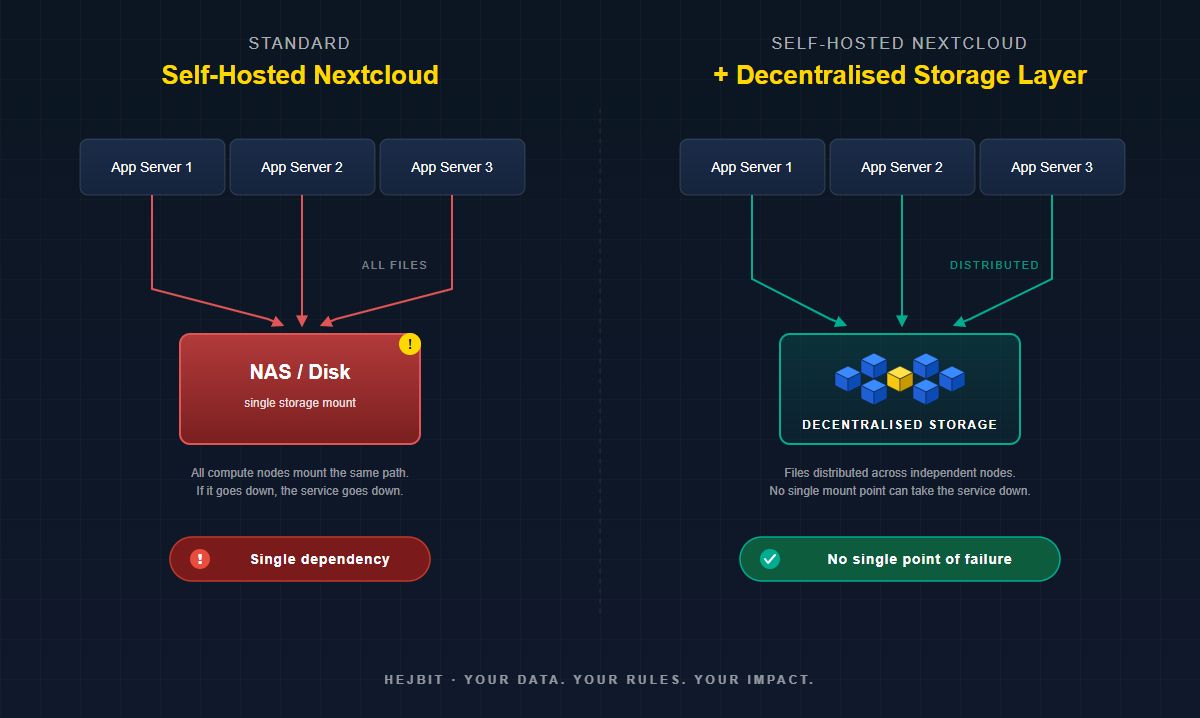
Self-hosting Nextcloud is a sound decision. It puts the application under your control, removes dependency on third-party platforms, and gives your team full visibility into the infrastructure you run. Control at the application layer, however, is not the same as resilience at the storage layer, and that distinction is what most deployments discover the hard way. This post is about the gap between what self-hosting promises and what most setups actually deliver, specifically at the layer where the files actually live. Two terms come up often below: high availability (HA), the property of a system that keeps running even when individual components fail, and single point of failure (SPOF), any one component whose failure takes the whole service down with it.
Self-Hosting Is the Right Call. But It Does Not Solve Everything.
The decision to self-host Nextcloud is usually a well considered one. You want control over your own data. You want to avoid vendor lock-in. You want to know exactly where your files are and who can access them. Those are all legitimate, well-reasoned motivations; and Nextcloud is genuinely one of the very best tools available for this.
But there is a gap between what self-hosting promises and what most deployments actually deliver. And it lives almost entirely in the storage layer.
Self-hosted Nextcloud setups typically are operationally sound at the compute and application layer. Admins who care enough to self-host also tend to care enough to set up proper app server redundancy, configure caching, and keep software updated. The storage layer on the other hand tend to be a completely different story. It is frequently treated as a solved problem when in fact it is not.
What Self-Hosted Nextcloud Storage Actually Controls (and What It Does Not).
Self-hosting gives you control over three things: where your application runs, who administers it, and what your users experience. These are meaningful and important factors. What it does not automatically give you is resilience in the layer that matters most: where all the files actually live.
Consider what a typical production self-hosted Nextcloud setup looks like from a storage perspective:
- A NAS or SAN device mounted to the application server via NFS or SMB
- A local disk array attached directly to the primary server
- A self-hosted MinIO instance running on a single machine or small cluster
- An S3-compatible bucket from a third-party provider
In all four cases, the self-hosted Nextcloud instance is fully under your control. In all four cases, there is a single storage dependency that, if it fails,takes the entire service down with it! The application is self-hosted but that doesn't remove the risk of that single point of failure.
The Three Promises of Self-Hosting (And Where Storage Breaks Them)
Promise 1: Your data is under your control
This is true at the application layer. You control the Nextcloud admin panel, the user accounts, the sharing policies, and the API. But if your storage backend is a third-party S3 provider, that provider can easily suspend your account, experience an outage, or to their own convenience change their terms of service. The application is yours; the data custody clearly is not.
Even with a local NAS, physical control is not the same as resilience. Harware failure make locally controlled data permanently and irrevocably inaccessible and lost. Self-hosting is surely not the same as sovereign data architecture.
Promise 2: You are not dependent on a single vendor
This is partially true. You are not dependent on the calculative benevolence of Google Drive or Dropbox for your file interface. But if your Nextcloud data directory sits on a single device from a single manufacturer, you have simply replaced one dependency with another. The brand on the NAS is different; the single point of failure is identical.
Vendor independence at the application layer is valuable. But genuine independence demands and requires that no single provider, device, or geographic location holds the only copy of your data.
Promise 3: You can control availability and uptime
This is the promise most often broken by storage architecture. You can control application uptime with load balancers and multiple compute nodes. You cannot control storage uptime if everything points at the same mount. When the storage goes down, the application goes down regardless of how many app servers are running.
The Uptime Institute's 2025 Global Outage Report found that the majority of significant outages trace back to infrastructure dependencies that operators believed were managed; but were not. Storage is the most common of those dependencies.
The Pattern We See Across Self-Hosted Deployments
After working with self-hosted infrastructure teams, a pattern emerges consistently. The conversation usually starts with: we have Nextcloud running well. App servers are redundant. Database has failover. But then comes the storage question.
The most common responses:
- "We have RAID on the NAS." RAID is not high availability (HA). It protects against single drive failure. A RAID array is still a single appliance that can fail completely if the controller, power supply, or firmware encounters a critical error.
- "We back up nightly." Backups are not availability. A nightly backup means a potential 24-hour data loss window plus however long restore takes. For many organisations that is measured in hours, not minutes.
- "We use a cloud S3 provider." This is the strongest of the three, but it reintroduces third-party dependency and data custody risk. It also creates a compliance question for GDPR-regulated organisations: your data may be physically located in a region you did not choose, accessible to parties you did not authorise.
None of these are wrong decisions. They are reasonable responses to real constraints. But they all share the same underlying gap: the storage layer still has a single point of failure (SPOF). This means that the underlying problem is never addressed att the root-level. For any self-hosted Nextcloud storage deployment to be genuinely resilient, that gap needs to be addressed at the architecture level, not patched with backup schedules which introduce new complex problems and risks.
What the Storage Layer Actually Needs
For self-hosted Nextcloud storage to meet production reliability standards, the storage layer needs to satisfy three properties simultaneously. Most implementations satisfy one or two at most:
- No single hardware dependency. The data must remain accessible if any single physical device fails; not just a single drive, but the controller, the enclosure, or the entire appliance.
- No single geographic dependency. The data must remain accessible if a physical location becomes unavailable due to power, connectivity, or physical damage. Some would claim that political tensions affecting trade geopolitically is the main geographic vulberability for your data.
- No single operator dependency. The data must remain recoverable without relying on a single vendor, account, or administrator credential.
This is not an exotic requirement. It is the standard that enterprise storage has aimed at for decades. The gap for most self-hosted Nextcloud deployments is not healthy ambition; it is access to architecture that achieves this without requiring a dedicated storage engineering team to operate it.
Why This Has Been Hard to Solve for Self-Hosters
Enterprise-grade distributed storage has existed for years. Ceph, GlusterFS, and commercial SAN solutions all achieve genuine resilience. The problem is operational complexity. Running a production Ceph cluster requires specialist knowledge, dedicated hardware, and ongoing operational attention that most Nextcloud admin teams do not have capacity for.
Self-hosted S3-compatible storage (MinIO in distributed mode) comes closer, but still requires a multi-node setup, quorum management, and careful capacity planning to achieve genuine resilience rather than the false comfort of a single-node MinIO deployment.
What has been missing is a storage backend that delivers distributed resilience with the same operational simplicity as a NAS; something you connect to, configure once, and trust. That is exactly what we built HejBit to be: a solution designed specifically for self-hosted Nextcloud storage environments that want enterprise-grade resilience without enterprise-grade operational overhead. It mounts as Nextcloud external storage, handles chunking and distribution automatically, and eliminates the storage single point of failure (SPOF) without adding a new operations burden.
Self-hosting Nextcloud is the right decision. Getting the storage layer right is what makes that decision complete and durable.
What Comes Next
Find out on our blog more about the actual architecture of Nextcloud with a decentralised storage backend; what changes in the stack, what the config looks like, and what your users experience (nothing different). For teams running self-hosted Nextcloud storage today, the integration is designed to run seamlessly alongside your existing setup, not to replace anything.
If you want to see how this works in your own environment, the Early Adopter Program gives you live access to test HejBit with your own Nextcloud instance.
30 days, decentralised storage for your most critical files, Nextcloud-native integration, no migration required.
HejBit is a product of MetaProvide, a European not-for-profit building decentralised infrastructure for organisations that take data sovereignty seriously.