Improve Nextcloud Resilience Without Changing Your Workflow
A parallel integration approach to storage resilience: no migration, no downtime, no risk to existing data. Learn how Nextcloud admins can add a decentralised storage backend with HejBit in under 20 minutes, without touching existing workflows or taking the service offline.
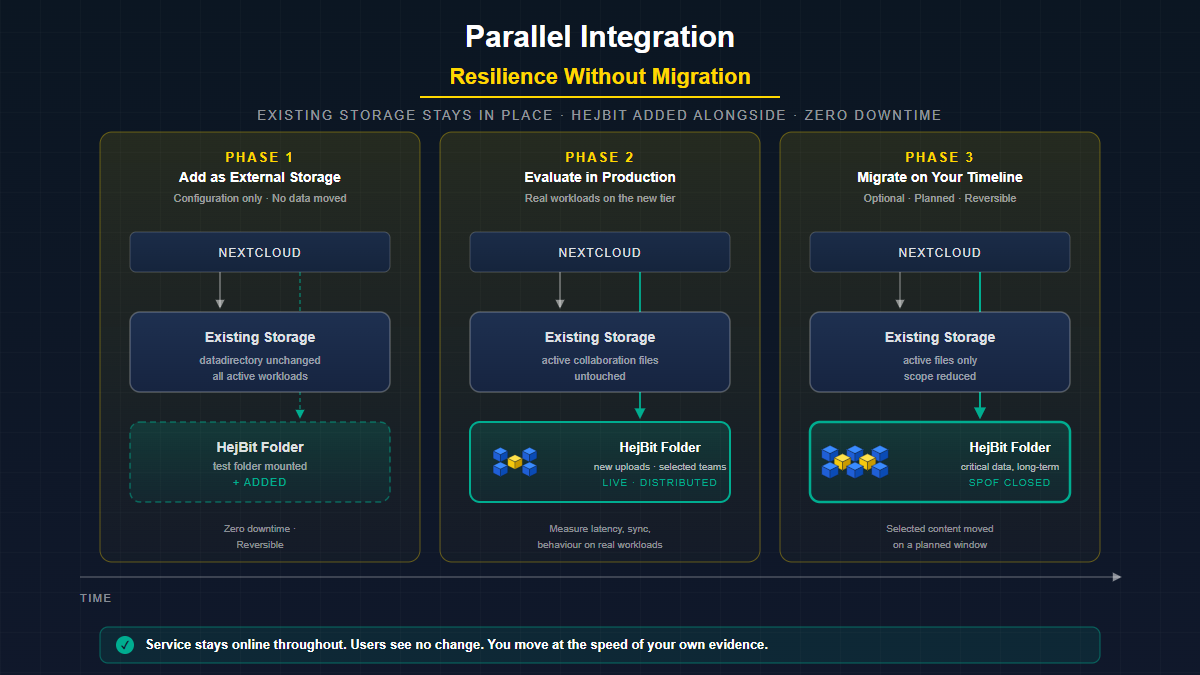
The most common objection to improving Nextcloud storage resilience is not disagreement about the risk; it is the perceived cost of addressing it. Admins know the single point of failure is there. The question is whether the fix requires a migration, a maintenance window, and weeks of planning.
This post covers a zero-migration approach: a parallel integration method that lets you add a decentralised storage backend without moving existing data, without changing user workflows, and without taking the service offline.
Why Storage Resilience Gets Delayed
Talk to any Nextcloud administrator who hasn't addressed storage resilience and the reason is almost always the same: "We know it's a risk, but we can't afford the disruption of fixing it right now."
That objection is understandable. Changing a storage backend in production is genuinely risky. A failed migration can cause data loss. A complex migration requires downtime windows. And when something goes wrong, it's your name on the incident report.
This is why introducing decentralised storage as a parallel integration - not a replacement - matters. It sidesteps the entire risk profile.
What Makes This Different
Before walking through the integration, it's worth clarifying what HejBit actually does, and doesn't do.
How it works: When a file is uploaded to a HejBit-mounted folder, Nextcloud sends it to the HejBit Gateway, which chunks the file into smaller pieces and distributes those pieces across a global network of nodes. No single node holds a complete file. No single entity can access the whole file, withhold it, or lose it.
What it is not: HejBit does not (yet) encrypt files client-side. The protection comes from the architecture - distribution and redundancy - rather than envelope encryption. End-to-end encryption is on the roadmap but has not shipped. This distinction matters for compliance and threat-model conversations. What you get today is structural resilience, not cryptographic confidentiality at rest. One option hard to beat if you are so inclined is you yourself doing the encryption before upload to the decentralised storage.
Where It Fits
HejBit is designed for selective use; for your most critical files, not your entire storage backend. Full-datadirectory migrations are not the target. The strengths of chunked, distributed storage; resilience against node failure, geographic spread, access governed by keys rather than server-side permissions; matter most for a specific subset of your data.
The right approach is to identify the subset of files that need this level of protection and route them through HejBit. A finance team's audit records. Compliance-sensitive documents shared across regions. Data that must remain accessible even if a specific hosting provider or jurisdiction becomes unavailable. These are the files HejBit protects best.
The Parallel Integration Approach
Phase 1: Add HejBit as an external storage location (10–20 minutes, zero downtime)
- Configure the HejBit endpoint in Nextcloud's External Storage app
- Create a test folder mounted on the decentralised backend
- Upload test files, verify read/write operations
Phase 2: Evaluate in production conditions (30 days)
- Direct new uploads for a specific team or project to the HejBit-backed folder
- Simulate node failure
- Measure actual latency impact on your specific use cases
- Confirm behaviour of desktop sync client, mobile app, and WebDAV connections
Phase 3: Route your most important data (targeted, no migration needed)
- Identify the subset of files that benefit most from decentralised resilience: sensitive documents, compliance-critical records, data that must survive a regional outage or unilateral access restriction
- Use Nextcloud's built-in copy or move to transfer only these files into HejBit-backed folders; no maintenance window, no custom scripting, no mass migration
At no point during Phases 1 through 3 do your users experience any disruption.
What Users See (Nothing Different)
The user experience is identical. The Nextcloud web UI renders files from the index, not directly from the storage backend. The desktop client syncs via Nextcloud's WebDAV and sync protocol. File sharing, version history, Talk attachments, collaborative editing; all mediated through Nextcloud's application layer.
When the storage layer changes behind the scenes, the user's interface stays the same. That is the point.
The Admin Experience During Integration
- Create an access key in the HejBit dashboard (Keys section)
- Copy the key token to your clipboard
- Open Nextcloud External Storage settings (under Administration, not Personal)
- Add HejBit-Swarm from the dropdown; paste the key, name the folder, set user/group access
- Save and verify; a green checkmark confirms the connection
- Monitor via standard Nextcloud logging
Support during Early Adopter period: Direct access to HejBit engineering via email or ticket system.
The Operational Upside Beyond Resilience
Targeted backup reduction for critical data
With your most important files protected by distributed redundancy, those specific files no longer rely on backup schedules alone. The storage layer itself handles node failures for that subset. Your primary storage backup strategy remains in place for everything else; but the files that matter most now have an architectural safety net below that backup.
Geographic distribution without geographic infrastructure
If your organisation operates across multiple locations, decentralised storage provides data accessibility across regions without requiring you to manage multi-site replication yourself. Chunk distribution and retrieval are handled by the network, not by your operations team.